¶ Intro
The Fanvil i30s is an Audio/Video IP door station with built in access controller. Door station is setup as an extension on the network, allowing users to direct dial the door to talk to visitors, or manually unlocking the door to allow entry. Access codes and cards may also be entered into the system allowing authorized users to freely enter secured areas.
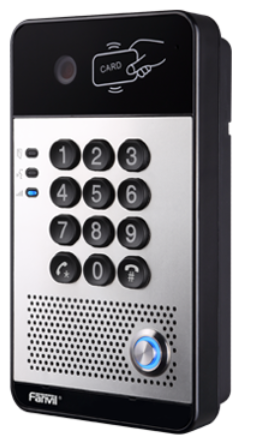
¶ Features
- 2 Lines
- HD Audio and Video
- POE Powered
- Weatherproof models available
- Access Control Capable.
¶ Documents
Spec Sheet - https://www.fanvil.com/Uploads/Temp/download/20200507/5eb3a2935e4fa.pdf
User Manual - https://www.fanvil.com/Uploads/Temp/download/20200507/5eb3a2b24e998.pdf
Mounting Manual - https://www.fanvil.com/Uploads/Temp/download/20200427/5ea67249ca1c4.pdf
¶ How To
¶ Open Door with Access Code/Card
- Walk up to door and present card to reader
- Enter access code and press #
¶ Change Extension for Blue Button
- Login to Fanvil i30s
- http://IP_address
- Click on Function in the lower left corner
- Location Function Key Settings
- Change Number 1 to the extension or ring group you wish to ring when the button is pressed
- If you have a ring group setup, you must change the extensions from the phone server
¶ Add Access Code
- Login to Fanvil i30s
- Click on EGS Access on the left side menu
- Locate Add Access Rule
- Enter Name
- Enter Access Code
- Select Add
¶ Add Access Card
- Login to Fanvil i30s
- Scan the card at the door, it will fail but the ID will be noted in the logs
- Click on EGS Logs
- Look for a result that says “Failed”, copy the Access ID for that card
- Click on EGS Access on the left side menu
- Locate Add Access Rule
- Enter Name
- Paste the ID that you copied in step #3
- Select Add
¶ Setup
- Line
- Basic Settings
- Add extension
- Basic Settings
- EGS Settings
- Keypad Mode - Dial and Password
- Local Access Code Open Door Mode - Access Code Only
- Apply