¶ Intro
The Grandstream GXV3370 is a desk and wall mountable video phone with 12 programmable buttons. Customers often prefer the GXV3350 over the GXXV3370 because this phone is touch screen only. There are no physical buttons which may be a transition for some users. If you have a power-user that understands this is only touch screen, and wants the cutting edge, then this is the phone for you. This does have a larger screen compared to the GXV3350, but not overtly noticeable.
Android based phones can also load apps from the Play Store. Virtual Keypad, NVMS700, Zoom, and Teams all work without issue.
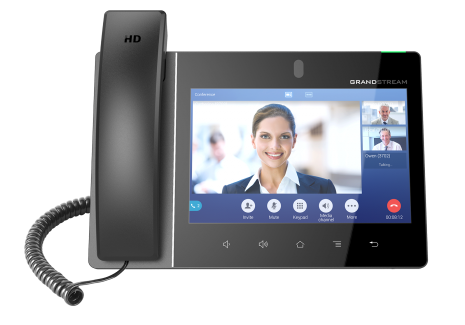
¶ Features
- 16 Accounts
- Android Based - App Enabled
- Optional Side car for 20 additional keys (up to 3 cars)
- Bluetooth
- Hardwired / Wireless
- Encryption
- Video
¶ Documents
Spec Sheet - http://www.grandstream.com/sites/default/files/Resources/datasheet_gxv3370_english.pdf
User Manual - http://www.grandstream.com/sites/default/files/Resources/gxv3370_user_guide.pdf
Admin Manual - http://www.grandstream.com/sites/default/files/Resources/gxv3370_administration_guide.pdf
Bluetooth Compatibility - http://www.grandstream.com/sites/default/files/Resources/gxv3370_headset_compatibility.pdf
Wifi Setup Guide - http://www.grandstream.com/sites/default/files/Resources/gxv33xx_wifi_guide.pdf
¶ How To
Voicemail - How to setup and retrieve voicemails
Transfer - How to send a caller to another extension
Call Park - How to send a call to a parking spot, and retrieve it on another phone
Ring Group - How to send calls to a group of phones
Conference Call - How to create a 3-way call between parties
Recordings - How to create recordings for IVR's and Announcements
Feature Codes - Star/Feature codes to enable and disable admin features
¶ Setup
- Open GDMS app on phone
- Add Device to GDMS
- Plug in phone and power up
- Login with admin/admin
- Change admin password
- Select Settings/TR-069
- Address - https://acs.gdms.cloud
- Enable Periodic Check In
- Save and Apply
- Reboot
- Verify that phone comes online with GDMS
- Upgrade firmware to latest version
¶ Programming
- All phones must have at least 2-lines to make/receive call waiting and conference calls.
- Feature Codes must be turned off to allow *732 recording to work.
- Account / Call Settings / DialPlan - { x+ | \+x+ | *x+ | *xx*x+ | \p\a\r\k\+*x+ |\f\l\o\w+*x+}
- Copy to all accounts.